
3.8 KiB
Linux
Useful commands and tips
ssh
Do not use default 22 port
ssh user@ip -p 22222
Login without password
# adds private key identities to the authentication agent
ssh-add ~/.ssh/id_rsa

# use locally available keys to authorise logins on a remote machine

ssh-copy-id user@ip -p 22222
IP table
Cron job
PS
ps aux | grep 'ruby'
List process, using grep to filter processes
tail
Tailing texts from file in realtime
tail -f a.log
f means following, auto append texts to console
nohup
Simply running application in background
df
df -h
Show disk usage and left, h means show in human readable way. Normally by MB/GB.
free
              total        used        free      shared  buff/cache   available
Mem:        3960624      416720      270024       22252     3273880     3264060
Swap:       4104188      109688     3994500
Show memory usage and
Watch
watch kubectl get pods
Continuous running the commands, watching the changes. By default it refresh the result every 2s.
Change timezone
TZ=Asia/Shanghai;
ln -snf /usr/share/zoneinfo/$TZ /etc/localtime
Check release
cat /etc/*-release
Debian check system version
cat /etc/issue

cat /etc/debian_version
htop
like top, but more
mosh
auto reconnect ssh
show last something time
last shutdown
last reboot
Count files in current folder
find . -type f | wc -l
Check if a port is open
Used Netcat
if ! nc -z localhost 5672; then
sleep 3;
fi
scp copy files between host
Copy files from remote server
scp your_username@remotehost.edu:foobar.txt /local/dir
Copy local files to remote server
scp /path/to/local/file user@server:/path/to/remote/file
Merge video files into one
ffmpeg -f concat -safe 0 -i ./files.txt -c copy output.mp4
In the files.txt you should list all the video clips like the following
file 1.flv
file 2.flv
file 3.flv
Curl
Curl is a very popular and powerful HTTP client, there is also another very good tool called httpie written in Python which is even eaiser to use.
The following are some useful commands:
Post request with file
curl --data "@$(pwd)/fixure/sample.json" --user "foo:bar" localhost:8080/api/abc
Mount
Mount NFS(Network file system) to local
mkdir /to-local-folder
# mount
mount -t nfs -O user=abc,pass=pass 192.168.1.2:/nfs-folder  /to-local-folder

# remount
mount -o remount /to-local-folder
Mount folder permanently
In the example above, the mounted folder will lost the connection when you restart your system, in order to permanently mount the folder, you will need to edit /etc/fstab by adding one more line
192.168.1.2:/nfs-folder /to-local-folder nfs defaults 0 0
You can specify more options
192.168.0.216:/nfs-folder /to-local-folder nfs defaults,proto=tcp,port=2049 0 0
Popular Distributions
Debian
Ubuntu
Manjaro
Fedora
Fedora is the main project, and it’s a community-based, free distro focused on quick releases of new features and functionality.
CentOS
CentOS is basically the community version of Redhat. So it’s pretty much identical, but it is free and support comes from the community as opposed to Redhat itself.
RHEL (RedHat Enterprise Linux)
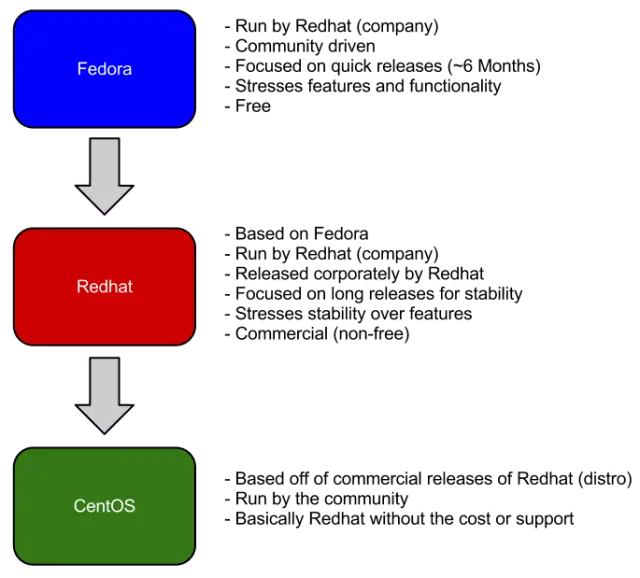
RHEL is the corporate version based on the progress of that project, and it has slower releases, comes with support, and isn’t free.