mirror of
https://github.com/wahyd4/knowledge.git
synced 2026-08-09 05:06:28 +10:00

156 lines
6.1 KiB
Markdown
156 lines
6.1 KiB
Markdown
# AWS
|
||
- EC2
|
||
- EC2 container
|
||
- Cloudfront
|
||
- S3
|
||
- RDS
|
||
|
||
# CI
|
||
- Jenkins
|
||
- Gitlab CI
|
||
- Travis
|
||
|
||
# Everything is code
|
||
- Infrastructure as code
|
||
- CI config as code
|
||
- Dockerfile
|
||
|
||
# CD
|
||
|
||
|
||
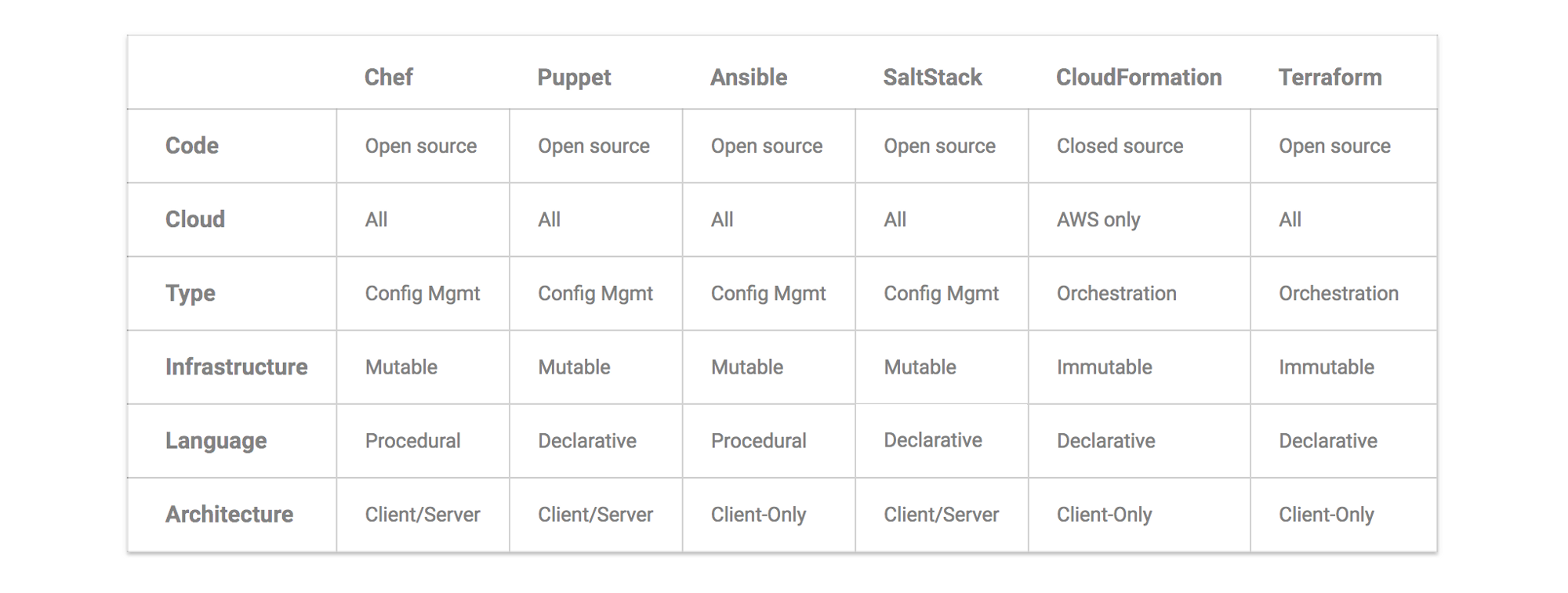
## Automation tools
|
||
|
||
### Capistrano
|
||
A ruby tool for deploy applications
|
||
### Chef
|
||
|
||
#### What is chef
|
||
|
||
Chef enables you to manage and scale cloud infrastructure with no downtime or interruptions. Freely move applications and configurations from one cloud to another. Chef is integrated with all major cloud providers including Amazon EC2, VMWare, IBM Smartcloud, Rackspace, OpenStack, Windows Azure, HP Cloud, Google Compute Engine, Joyent Cloud and others.
|
||
|
||
Chef running a `chef-client` on each node to be a runner to install applications on remote server. The client can use both `pull` and `push` modes to to communication.
|
||
|
||
More:
|
||
* Chef vs ansible: <https://www.chef.io/ansible/>
|
||
### Ansible
|
||
|
||
#### What is Ansible
|
||
Ansible is an IT automation tool. It can configure systems, deploy software, and orchestrate more advanced IT tasks such as continuous deployments or zero downtime rolling updates. Ansible’s goals are foremost those of simplicity and maximum ease of use.
|
||
|
||
Ansible uses `SSH` to execute commands on remote server and use `RabbitMQ` at the transport level by `push` updates
|
||
|
||
### Puppet
|
||
|
||
Is also a configuration management tool for servers and designed to install and manage software on existing servers.
|
||
|
||
### Packer
|
||
|
||
Packer is a tool to allows you build a machine image which contains all preinstalled and configged applications.
|
||
|
||
### Terraform
|
||
|
||
#### What is Terraform
|
||
Terraform use a declarative language to describe the current state of infrastructure, and there is no server side agent installed.
|
||
|
||
Terraform is more about declare the resources/services requirements, rather than install softwares and libraries on remote server.
|
||
|
||
|
||
### Basic steps
|
||
```bash
|
||
# go to the folder which stores the environment credentials
|
||
terraform init # Initialize a new or existing Terraform working directory by creating initial files, loading any remote state, downloading modules, etc.
|
||
terraform get # Downloads and installs modules that defined by configuration files
|
||
terraform plan # Kind of try run, you will what kind of changes you will have
|
||
terraform apply # Apply changes to cluster
|
||
```
|
||
|
||
# HA High Availability
|
||
- LB - haproxy
|
||
- Keepalived -- vrrp
|
||
- Nginx + Keepalived
|
||
- Heartbeat
|
||
|
||
# Network
|
||
- IP
|
||
- Private IP Addresses
|
||
- 10.0.0.0 – 10.255.255.255
|
||
- 172.16.0.0 – 172.31.255.255
|
||
- 192.168.0.0 – 192.168.255.255
|
||
|
||
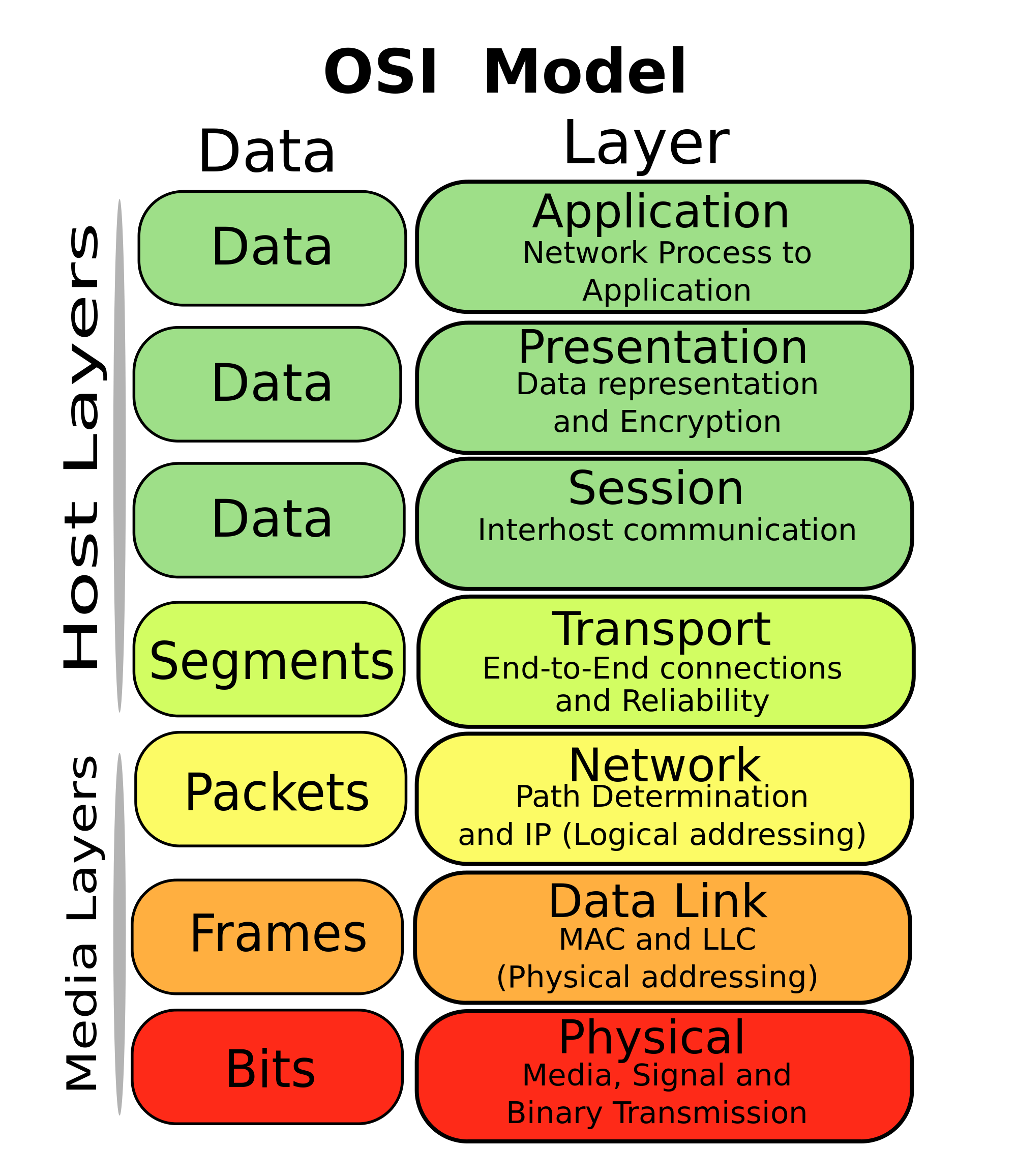
## OSI Model( 7 layers network)
|
||
|
||
|
||
|
||
## CIDR blocks
|
||
|
||
[Wikipedia](https://en.wikipedia.org/wiki/Classless_Inter-Domain_Routing)
|
||
|
||
|**Address**|**Difference**|**Mask**|**Addresses**|**2n**|**Relative**|**Restrictions**|**Typical use**|
|
||
| :----:|:---:|:---:|:---:|:---:|:---:|:---:|:---:|
|
||
|a.b.c.d/32|+0.0.0.0|255.255.255.255|1|20|1⁄256 C| |Host route
|
||
|a.b.c.d/31|+0.0.0.1|255.255.255.254|2|21|1⁄128 C|d = 0 ... (2n) ... 254|Point to point links (RFC 3021)
|
||
|a.b.c.d/30|+0.0.0.3|255.255.255.252|4|22|1⁄64 C|d = 0 ... (4n) ... 252|Point to point links (glue network)
|
||
|a.b.c.d/29|+0.0.0.7|255.255.255.248|8|23|1⁄32 C|d = 0 ... (8n) ... 248|Smallest multi-host network
|
||
|a.b.c.d/28|+0.0.0.15|255.255.255.240|16|24|1⁄16 C|d = 0 ... (16n) ... 240|Small LAN
|
||
|a.b.c.d/27|+0.0.0.31|255.255.255.224|32|25|⅛ C|d = 0 ... (32n) ... 224|
|
||
|a.b.c.d/26|+0.0.0.63|255.255.255.192|64|26|¼ C|d = 0, 64, 128, 192|
|
||
|a.b.c.d/25|+0.0.0.127|255.255.255.128|128|27|½ C|d = 0, 128|Large LAN
|
||
|a.b.c.0/24|+0.0.0.255|255.255.255.0|256|28|1 C| |
|
||
|a.b.c.0/23|+0.0.1.255|255.255.254.0|512|29|2 C|c = 0 ... (2n) ... 254|
|
||
|a.b.c.0/22|+0.0.3.255|255.255.252.0|1,024|210|4 C|c = 0 ... (4n) ... 252|Small business
|
||
|a.b.c.0/21|+0.0.7.255|255.255.248.0|2,048|211|8 C|c = 0 ... (8n) ... 248|Small ISP/ large business
|
||
|a.b.c.0/20|+0.0.15.255|255.255.240.0|4,096|212|16 C|c = 0 ... (16n) ... 240|
|
||
|a.b.c.0/19|+0.0.31.255|255.255.224.0|8,192|213|32 C|c = 0 ... (32n) ... 224|ISP/ large business
|
||
|a.b.c.0/18|+0.0.63.255|255.255.192.0|16,384|214|64 C|c = 0, 64, 128, 192|
|
||
|a.b.c.0/17|+0.0.127.255|255.255.128.0|32,768|215|128 C|c = 0, 128|
|
||
|a.b.0.0/16|+0.0.255.255|255.255.0.0|65,536|216|256 C = B| |
|
||
|a.b.0.0/15|+0.1.255.255|255.254.0.0|131,072|217|2 B|b = 0 ... (2n) ... 254|
|
||
|a.b.0.0/14|+0.3.255.255|255.252.0.0|262,144|218|4 B|b = 0 ... (4n) ... 252|
|
||
|a.b.0.0/13|+0.7.255.255|255.248.0.0|524,288|219|8 B|b = 0 ... (8n) ... 248|
|
||
|a.b.0.0/12|+0.15.255.255|255.240.0.0|1,048,576|220|16 B|b = 0 ... (16n) ... 240|
|
||
|a.b.0.0/11|+0.31.255.255|255.224.0.0|2,097,152|221|32 B|b = 0 ... (32n) ... 224|
|
||
|a.b.0.0/10|+0.63.255.255|255.192.0.0|4,194,304|222|64 B|b = 0, 64, 128, 192|
|
||
|a.b.0.0/9|+0.127.255.255|255.128.0.0|8,388,608|223|128 B|b = 0, 128|
|
||
|a.0.0.0/8|+0.255.255.255|255.0.0.0|16,777,216|224|256 B = A| |Largest IANA block allocation
|
||
|a.0.0.0/7|+1.255.255.255|254.0.0.0|33,554,432|225|2:00 am|a = 0 ... (2n) ... 254|
|
||
|a.0.0.0/6|+3.255.255.255|252.0.0.0|67,108,864|226|4:00 am|a = 0 ... (4n) ... 252|
|
||
|a.0.0.0/5|+7.255.255.255|248.0.0.0|134,217,728|227|8:00 am|a = 0 ... (8n) ... 248|
|
||
|a.0.0.0/4|+15.255.255.255|240.0.0.0|268,435,456|228|16 A|a = 0 ... (16n) ... 240|
|
||
|a.0.0.0/3|+31.255.255.255|224.0.0.0|536,870,912|229|32 A|a = 0 ... (32n) ... 224|
|
||
|a.0.0.0/2|+63.255.255.255|192.0.0.0|1,073,741,824|230|64 A|a = 0, 64, 128, 192|
|
||
|a.0.0.0/1|+127.255.255.255|128.0.0.0|2,147,483,648|231|128 A|a = 0, 128|
|
||
|0.0.0.0/0|+255.255.255.255|0.0.0.0|4,294,967,296|232|256 A| |
|
||
|
||
# tools
|
||
## git
|
||
- cherrypick
|
||
- rebase
|
||
- commit
|
||
- checkout
|
||
- checkout -b br com
|
||
- push
|
||
- --tags
|
||
- push tags
|
||
- —all
|
||
- push all branchs
|
||
- -f
|
||
- force push
|
||
- branch -d xx
|
||
- delete a local branch
|
||
- remote
|
||
- show xxx
|
||
- show info of a remote branch
|
||
- add xxx
|
||
- add a remote repo
|
||
- branch
|
||
- list all the branchs
|
||
- mv Rename/move files and folder with git history records
|
||
|
||
e.g. git mv -k ./a/b ./c/d option `k` would avoid the "can not move directory into itself" error.
|
||
## oh-my-zsh
|
||
## IDE/tools
|
||
- Intellij
|
||
- vscode
|
||
|
||
## Security
|