mirror of
https://github.com/wahyd4/knowledge.git
synced 2026-08-09 05:06:28 +10:00

178 lines
3.5 KiB
Markdown
178 lines
3.5 KiB
Markdown
# Relation
|
|
- Mysql
|
|
- Postgres
|
|
- Microsoft SQL Server
|
|
- Oracle
|
|
- Sqlite
|
|
|
|
# NoSql
|
|
- Monodb
|
|
- Replica Set
|
|
- Primary
|
|
- Secondary
|
|
- Hidden
|
|
- Redis
|
|
- Cluster
|
|
- Strong recommend 3 masters and 3 slaves
|
|
- Hbase
|
|
- Cassendra
|
|
|
|
# SQL
|
|
|
|
## Index
|
|
- Index is unique but not mandatory
|
|
## join
|
|
|
|
## MYSQL
|
|
|
|
### Tips
|
|
- datetime
|
|
- 8 bytes
|
|
`1000-01-01 00:00:00 ~ 9999-12-31 23:59:59`
|
|
- store a absolute value
|
|
- timestamp
|
|
- 4 bytes `1970-01-01 08:00:01 ~ 2038-01-19 11:14:07`
|
|
- will impacted by time zone
|
|
- index by timestamp will be faster than datetime due to 4 bytes.
|
|
|
|
## Postgres
|
|
|
|
### Commands
|
|
|
|
```bash
|
|
\list # list databases
|
|
\c one # switch to datebase one
|
|
\dt list all the tables
|
|
```
|
|
|
|
### Create a table
|
|
|
|
```sql
|
|
CREATE TABLE pm25
|
|
(
|
|
id SERIAL, -- id with auto increment
|
|
time TIMESTAMP not NULL,
|
|
pm25 integer DEFAULT 0,
|
|
concentration integer DEFAULT 0,
|
|
city VARCHAR not NULL
|
|
);
|
|
|
|
```
|
|
### Import data from CSV
|
|
```sql
|
|
COPY persons(first_name,last_name,dob,email)
|
|
FROM 'C:\tmp\persons.csv' DELIMITER ',' CSV HEADER;
|
|
```
|
|
### Import data with SQL
|
|
```bash
|
|
psql -U postgres -W -p 5432 -d somename -h 127.0.0.1 -f ~/somefile.sql
|
|
```
|
|
|
|
### Create user
|
|
```sql
|
|
CREATE DATABASE yourdbname;
|
|
CREATE USER youruser WITH ENCRYPTED PASSWORD 'yourpass';
|
|
GRANT ALL PRIVILEGES ON DATABASE yourdbname TO youruser;
|
|
```
|
|
|
|
### Update
|
|
|
|
```sql
|
|
UPDATE badges set type = 'onetype' where label != ''
|
|
```
|
|
|
|
### Queries
|
|
|
|
#### Query with json field
|
|
|
|
```sql
|
|
select count(*), arguments ->> 'SomeProp', arguments -> 'FirstLevel' ->> 'SecondLevel' from jobs group by arguments ->> 'SomeProp', arguments -> 'FirstLevel' ->> 'SecondLevel'
|
|
```
|
|
### Group by
|
|
|
|
```sql
|
|
select job_ids from (
|
|
select count(*) as c, string_agg(cast(job_id as varchar),',') as job_ids, args ->> 'ResourceID' args -> 'Measurement' ->> 'Property'
|
|
from jobs
|
|
group by args ->> 'ResourceID', args -> 'Measurement' ->> 'Property'
|
|
) as f1 where c > 1;
|
|
```
|
|
#### Group by time
|
|
|
|
To get data entries grouped by time (minute/hour/day/month)
|
|
|
|
```sql
|
|
select
|
|
date_trunc('day', created_at), -- or hour, day, week, month, year
|
|
count(1)
|
|
from view_records
|
|
group by 1
|
|
```
|
|
|
|
If you want to group time base on a specific timezone and the timestamp field you choose contains that information.
|
|
|
|
```sql
|
|
select
|
|
date_trunc('day', created_at AT TIME ZONE 'Australia/Melbourne'), -- or hour, day, week, month, year
|
|
count(1)
|
|
from view_records
|
|
group by 1
|
|
```
|
|
|
|
If the time field doesn't have timezone information, we will need to ask postgres to intercept the time to the timezone we would like to use
|
|
|
|
```sql
|
|
select
|
|
date_trunc('day', created_at AT TIME ZONE 'Australia/Melbourne') AT TIME ZONE 'China/Beijing')
|
|
count(1)
|
|
from view_records
|
|
group by 1
|
|
```
|
|
|
|
### Postgres trigger example
|
|
|
|
Giving we have a table called users, and the columns are:
|
|
```bash
|
|
id name age
|
|
1 tom 10
|
|
2 Dave 17
|
|
```
|
|
there is a requirement which is when some user's age turn to `18` move that person to `adults` table.
|
|
The adults table have the same fields with `users`.
|
|
|
|
The potential trigger implementation can be
|
|
|
|
```sql
|
|
|
|
CREATE OR REPLACE FUNCTION to_adults ()
|
|
RETURNS TRIGGER
|
|
AS $$
|
|
BEGIN
|
|
INSERT INTO adults VALUES (new.*);
|
|
DELETE FROM users WHERE age >= 18;
|
|
RETURN NEW;
|
|
END;
|
|
$$
|
|
LANGUAGE plpgsql;
|
|
|
|
CREATE TRIGGER to_adults_trigger
|
|
AFTER UPDATE ON users
|
|
FOR EACH ROW
|
|
WHEN (NEW.age >= 18)
|
|
EXECUTE PROCEDURE to_adults();
|
|
```
|
|
|
|
|
|
|
|
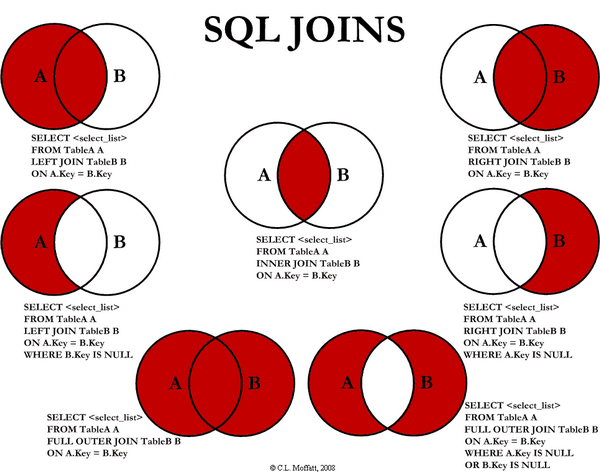
## SQL join diagram
|
|
|
|
|
|
|
|
# Message Queue
|
|
|
|
# Rabbitmq
|
|
|
|
# activeMQ
|
|
|
|
# Redis
|